Textured bricks
This macro grew out of a need for realistic brick objects that could not be satisfactorily met using normals or isosurfaces. Using normals with radiosity is laboriously slow, and using multiple isosurfaces produces a similar effect. What I really wanted to do was build a small number of really detailed bricks as meshes, and take advantage of POV-Ray's ability to copy meshes with only minor additional memory usage.
The TexturedBrick() macro builds a rounded box at the origin with its surface perturbed by a pigment function in the direction pointing away from the box centre. The pigment function can either be defined in the .inc file itself or in your scene file prior to macro use (in the latter case, the existing definition in the .inc file must either be commented out or removed, else it will override any previous definitions), and must be called 'gran'. The reason for this is that I haven't found any easy way of passing the function as a parameter; the name is somewhat arbitrary and you can easily change it in the .inc file if you don't like it! By default the function 'gran' is a granite pattern (see the examples below).
Invoking TexturedBrick(x_size, y_size, z_size, edge_radius, resolution,
surface_amplitude, texture_scale, move_vec) inserts a union of six mesh2
objects that blend together seamlessly to form the brick, centred on the
origin. The macro parameters are as follows:
x_size, y_size and z_size are the axis 'radii' of the cuboid,
i.e. width = 2*x_size
edge_radius = radius of curvature of the edges and
corners
resolution = number of polygons across the smallest
dimension
surface_amplitude = height of the texturing function
above/below the nominal box surface
texture_scale = texturing function scale factor
move_vec = vector to translate the texturing function
Download the macro textured_brick.inc.
Examples:
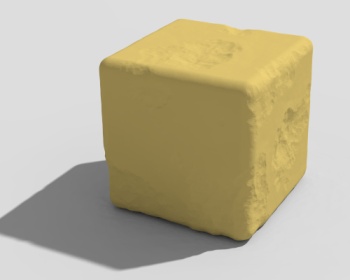 |
granite color_map { [0 color rgb 0.1] [0.4 color rgb 0] [1 color rgb 1] } TexturedBrick(1, 1, 1, 0.15, 100, -0.1, <5,5,5>, 0) |
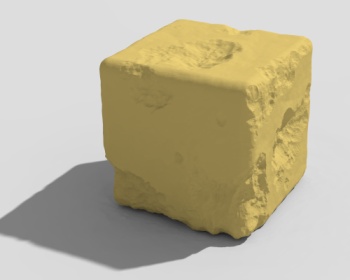 |
TexturedBrick(1, 1, 1, 0.15, 100, -0.25, <5,5,5>, 0) |
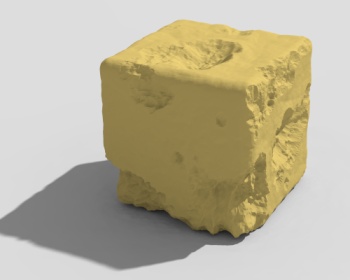 |
TexturedBrick(1, 1, 1, 0.15, 100, -0.4, <5,5,5>, 0) |
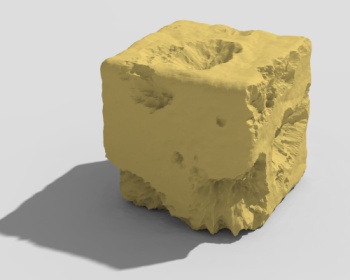 |
TexturedBrick(1, 1, 1, 0.15, 100, -0.6, <5,5,5>, 0) |
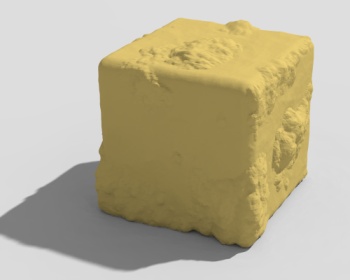 |
TexturedBrick(1, 1, 1, 0.15, 100, 0.25, <5,5,5>, 0) |
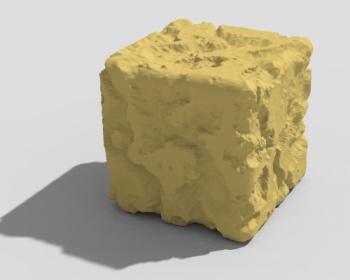 |
agate color_map { [0 color rgb 0.1] [0.4 color rgb 0] [1 color rgb 1] } TexturedBrick(1, 1, 1, 0.15, 100, -0.1, <1,1,1>, 0) |
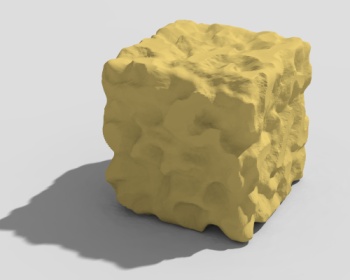 |
bozo turbulence 0.2 color_map { [0 color rgb 0.1] [0.4 color rgb 0] [1 color rgb 1] } TexturedBrick(1, 1, 1, 0.15, 100, -0.25, <0.25,0.25,0.25>, 0) |
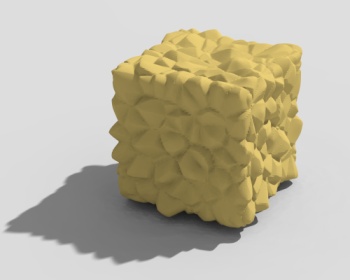 |
crackle color_map { [0 color rgb 1] [1 color rgb 0] } TexturedBrick(1, 1, 1, 0.15, 100, -0.2, <0.35,0.35,0.35>, 0) |
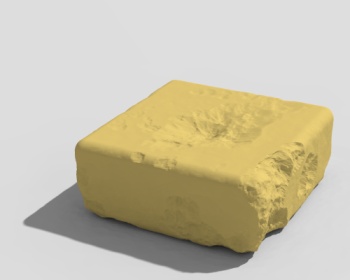 |
Granite again: TexturedBrick(1.25, 0.5, 1.25, 0.15, 50, -0.25, <5,5,5>, 0) |
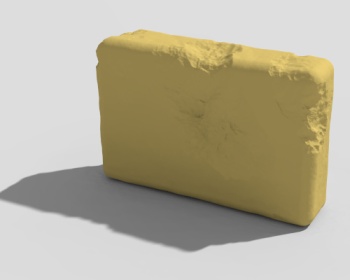 |
TexturedBrick(0.35, 1, 1.5, 0.15, 50, -0.25, <5,5,5>, 0) |
I use this macro when building walls or similar brick structures that will be seen close-up. Generally I declare 5 to 10 bricks with slightly different randomly-chosen colours, texture scales and texture positions, and place them in an array. When placing bricks in the scene, they can then be selected at random; giving them random rotations serves to increase the apparent number of different objects. In practice, it is all but impossible to spot identical copies with even quite small arrays to choose from.
Have fun!